Technology Toolbox
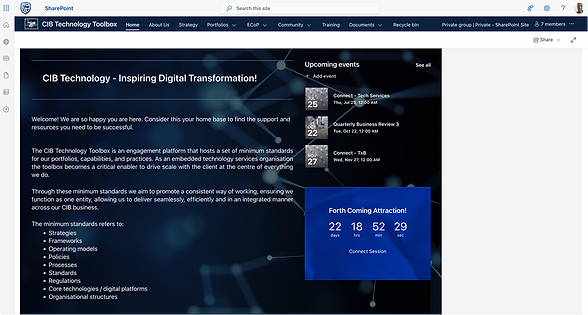
The CIB Technology Toolbox is a SharePoint-based platform used by staff to access tools, resources, and internal information. As the platform evolved, it became harder to navigate, inconsistent in structure, and less effective in supporting both new joiners and experienced employees.
I worked on improving the platform by restructuring content, refining the user experience, and aligning the visual language to better support usability, onboarding, and day-to-day productivity.
Project Overview
Role:
UX Designer
Company:
Standard Bank CIB
The challenge
The Toolbox existed, but it was not working as intended.
-
Content was not always relevant or useful
-
Navigation made it difficult to find information quickly
-
Visual design did not align with company standards
-
Accessibility considerations were not consistently applied
-
New joiners struggled to understand internal language and systems
This resulted in increased reliance on colleagues for support and time wasted searching for resources
My Role
I contributed to the redesign and improvement of the Toolbox, working across both design and implementation.
My focus areas included:
-
Evaluating the existing platform
-
Improving information architecture and content structure
-
Aligning the visual language with company standards
-
Supporting ongoing design and development decisions
Approach
-
Evaluating the existing platform
-
Before making changes, I conducted a full review of the Toolbox.
-
Each page was assessed based on three key questions:
-
Is this page necessary?
-
Is the content accurate and useful?
-
Does the design align with company standards?
-
This helped identify gaps and areas for improvement across structure, content, and usability.
2. Identifying key issues
The evaluation revealed several consistent problems:
-
Poor information architecture made navigation difficult
-
Content did not fully support user needs or business goals
-
Visual inconsistencies reduced clarity and trust
-
Accessibility was not properly considered
These issues confirmed that improvements needed to go beyond UI changes and address the overall experience.

3. Validating with users
To avoid making assumptions, we tested the platform with actual users.
We conducted two rounds of interviews:
Round 1: New joiners
We spoke to 6 graduates to understand how they interacted with the Toolbox.
The sessions included:
-
Understanding their mental models and familiarity with the organisation
-
Observing how they navigated the platform
-
Gathering expectations as they explored different pages
Key insights:
-
Internal language and acronyms created confusion
-
Navigation was not intuitive
-
Users expected similar types of content across sections
Round 2: Existing staff and leadership
We engaged more experienced employees and stakeholders to understand:
-
How the Toolbox supported their workflows
-
What content was most valuable
-
Where gaps existed
This helped balance onboarding needs with ongoing usage.


Redesigning the experience
Based on insights, the platform was updated to:
-
Improve navigation and content structure
-
Simplify language and reduce reliance on jargon
-
Align the visual design with company standards
-
Ensure content better supported user goals
The focus was not just on redesigning pages, but on making the platform more usable and relevant.
1. Constraints:
Because the platform was built on SharePoint, there were limitations:
-
Restricted layout flexibility
-
Constraints on images and visual quality
-
Technical complexity when implementing changes
These constraints required practical design decisions that balanced ideal solutions with what was feasible
2. Sustainability:
A key consideration was ensuring the platform could be maintained over time.
We focused on:
-
Structuring content in a way that was easy to update
-
Avoiding unnecessary complexity
-
Supporting a model that did not require constant full-time management


Result and impact
The improvements helped make the Toolbox more usable and effective:
-
Easier navigation and improved findability of resources
-
Better support for onboarding new joiners
-
More consistent and aligned visual experience
-
Reduced reliance on colleagues for basic information
-
Increased self-service across teams
